Ideas become MIDI
No mouse detours. No setup marathon. Press a key, hear the instrument, capture the idea.
KEZIO turns your computer keyboard into an expressive MIDI instrument. Scales, chords, and human feel – directly inside your DAW.
KEZIO sits right between your musical impulse and the DAW – making the path so short that technology stops feeling like technology.
No mouse detours. No setup marathon. Press a key, hear the instrument, capture the idea.
Scale Lock and Chord Mode keep you musically free without slowing you down with menus.
KEZIO sends true MIDI. Your instrument, your sound, and your project stay exactly where they are.
KEZIO keeps scales, chords, and expression under your fingers – so you can follow the idea instead of the interface.
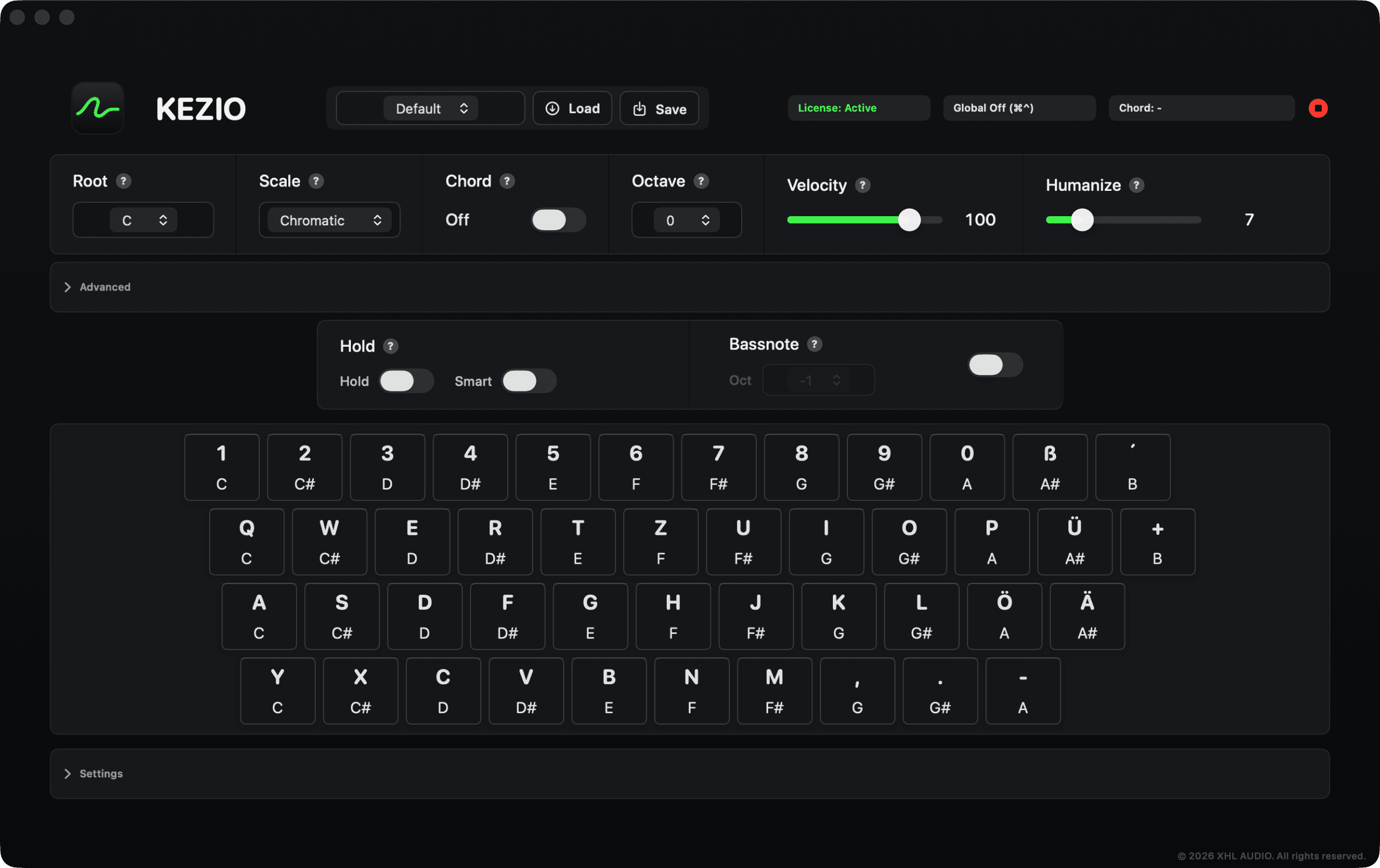
Scales, chords, dynamics, and MIDI routing stay within reach while you play.
Stay confidently in key – from Chromatic freedom to focused songwriting scales.
Triads, inversions, 7th, 9th, and 11th chords from a single key.
Subtle velocity variation makes repeated notes feel less static and more performed.
Match the intensity to your instrument and the musical moment.
Change registers instantly or add a solid foundation automatically.
KEZIO Out on macOS and KEZIO (DAW) on Windows send standard MIDI to every modern DAW.
Native builds for macOS and Windows, tuned for immediate response while you play.
Keep notes active, let the next chord replace them automatically, or spread chord tones into a natural attack.
Keep playing while your DAW is in front. Choose your own global hotkey to switch keyboard capture on or off instantly.
KEZIO does not replace a full-size MIDI keyboard. It replaces the moment when an idea disappears because your keyboard was not ready.
ONE MIDI WORKFLOW. EVERY SESSION.






KEZIO for macOS + Windows
Secure checkout · Instant access · EUR incl. applicable VAT
XHL Audio builds focused tools for modern music production – fast to understand and deep enough for professional sessions.
The most common answers before your first chord. XHL Audio Support is here for everything else.
Open supportKEZIO works with every DAW that accepts MIDI input for instrument tracks – including Logic Pro, Ableton Live, FL Studio, Studio One, Cubase, Nuendo, Pro Tools, REAPER, Bitwig, and GarageBand.
KEZIO includes native installers for Apple Silicon Macs running macOS 13 or later and for Windows 11 PCs with x64 or ARM64 processors.
Global Play keeps KEZIO playable while your DAW or another app is in front. You choose your own global hotkey and use it to switch keyboard capture on or off at any time. On macOS, the first activation requires Accessibility permission so KEZIO can receive those mapped keys in the background.
KEZIO is a MIDI instrument and intentionally generates no sound of its own. It plays the synth, sampler, piano, or any other instrument loaded in your DAW.
No. That is exactly what KEZIO is built for: your QWERTZ or QWERTY computer keyboard becomes a playable MIDI controller.
Maintenance and compatibility updates for your version are included. We will communicate major future versions clearly in advance.
After payment, the confirmation page unlocks your protected downloads and your personal license key is sent to the email address used at checkout. Keep the key private and store it safely.
No. Purchasing and initial license delivery happen online; while producing and playing, KEZIO runs locally on your computer.
Yes. One license can be activated on up to two computers you personally own or control, across macOS and Windows. The license key is personal and may not be shared with another person.
 KEZIO
KEZIO